Trade route allows you to set up routes for your merchant that he will walk every day at a certain hour.
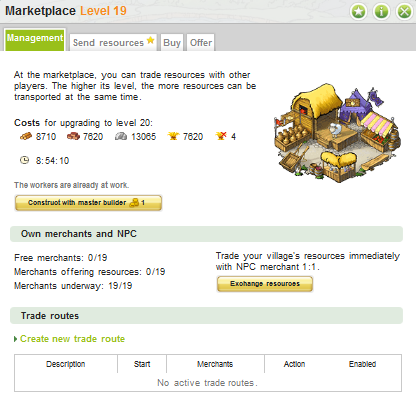
To set a trade route, you have to go to the marketplace. Once you have more than 1 village, the trade routes will appear. What you see here is the screen you get when you have no trade routes set yet. To create a trade route, you have to click the “Create new trade route” link.
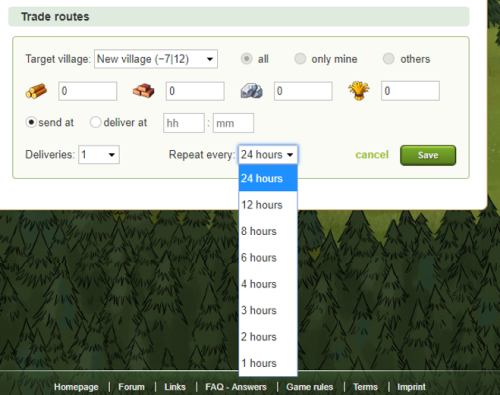
After clicking the “Create new trade route” link, this is the screen you will be shown. A little explanation on the screen you see here:
- Target village: the village the resources will be transported to. Note that you can only send resources by using this feature to your own villages and to Wonder of the World villages and artefact villages within your alliance/confederacy.
- Resources: Pretty obvious. The resources you want to send to the other village
- Send at / Deliver at: You can choose to set the start time or time you want the resources to arrive to make your deliveries more precise and less dependent on the distance to the target village.
- Deliveries: How many times you want your merchant to go?
When you create a new trade route you will now see a drop-down menu where you’ll have an option to select an interval with which you want your trade route duplicated.
How duplication works:
- You set your trade route to start at 04:00, choose 2 deliveries and select "Repeat every 4 hours" and click "Save".
- The game will create trade routes with same settings at 04:00, 08:00, 12:00, 16:00, 20:00 and 00:00.
- If you need, you can adjust created trade routes separately by clicking on "edit" button anytime
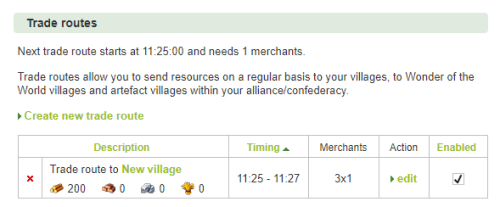
Once created, you will see this when clicking the “management” tab in the marketplace.
You can select a trade route and hit the ‘edit’ link or the red  . All of them pretty much explain their selves.
Further, you can see the:
- Timings showing both the start and delivery time of your merchants.
- The amount of resources involved per load,
- The merchants used and the time left for that route. If you look beneath the “merchants” heading, you see “3x1”. The “3” is the amount of deliveries; the “1” is the number of merchants. Therefore 1 merchant will walk 3 times.
The last column with the checkbox leave you the decision whether you want to have this specific trade route active/enabled or inactive/disabled.