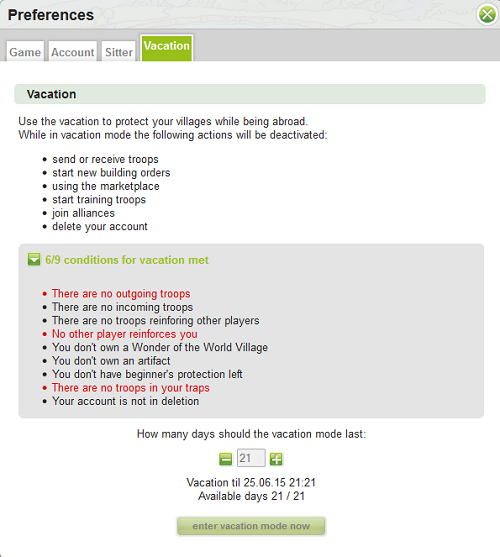
Players who need to take a break from the game for any reason and cannot find sitters can activate Vacation mode in the preferences. The maximum amount of days is 21, the minimum is 3. This is also depending on speed. The formula is days / speed.
The conditions that must be reached to activate this are:
- No outgoing troops
- No incoming troops to his villages / oasis
- No reinforcing troops for other accounts
- No reinforcing troops by other accounts in villages / oasis belonging to player’s account
- No Wonder of the World village
- No artifact village
- No beginner’s protection
- No troops in your traps
- Your account is not in deletion
Those rules means that it’s not possible to hide in vacation mode, for example, when you are attacked or when you are attacking someone. You also can’t protect Wonder of the World or an artifact for you alliance by using this mode.
When you meet those conditions and decide to turn vacation mode on you will first need to choose how many vacation days to select. You can use up to 21/speed days of vacation mode during a game round. For example on speed x2 you can use up to 11 days (21/2 = 10.5, rounded to 11). Be careful not to make a mistake here, because once the vacation mode starts, you cannot change its length, unless you use 10 Gold to go out of the mode immediately. If you decide to abort vacation with gold, you will get back all unused days (for example if you start vacation for 10 days and abort it right away, the first day would have already started, so you only get back 9 days). If you don’t abort vacation early, it will finish after the number of days you specified at the start.
During vacation mode:
- Your villages and oasis cannot be attacked
- Other players can see that you have vacation mode enabled
- Your villages may still be added to other player’s raid-lists, but they can’t be raided
- Your troops may starve
You cannot:
- Send troops to other players
- Receive troops from other players
- Do adventures with your hero.
- Start new building orders
- Order new troop training
- Start celebrations in the town hall
- Start parties in the brewery
- Use the market place (with the exception of NPC trade which still works)
- Start new research in the academy
- Start upgrades in the smithy
- Use auctions
- Join or create a new alliance
- Start account deletion
- Set up new trade routes
You can:
- Abort the vacation mode at any time with gold
- Exchange silver to gold
Extra info:
- Daily Rewards points will still reset at the usual time
- Actions you ordered before vacation mode was started will mostly continue as usual (including troop training, builds, Master Builder, ...). Trade routes however will be stopped
- The info box shows a notification about the vacation mode which also contains a link to the vacation abort page
- The inactivity account deletion is stopped while the account is in vacation mode
- The price of the "Abort Vacation" action is set to 10 gold
- Master builder will start any queued building orders when the requirements are met
- The payment shop will be shown when trying to abort Vacation Mode with insufficient amount of gold
You will find the vacation mode screen in your Preferences. You will not be able to enter vacation mode until all the conditions are met. Unmet conditions are in red. When all conditions are met you can use the -/+ to select the number of days you wish to take vacation.
Travian Version 4.6 Updates
- Vacation mode can be used for a maximum of 15 days only.
- Annexing an oasis in the last 48 hours blocks the player from entering vacation mode. The player can enter vacation mode once the oasis is annexed for longer than 48 hours or is lost again.
- A 12-hour cooldown is added to the "abort" action, once vacation starts.
- A 12-hour cooldown is added to the "start vacation" action, once vacation ends (regularly or after being aborted).
- Entering the alliance donation page during vacation brings the player to the "abort vacation mode" page (like all other sanctioned actions).