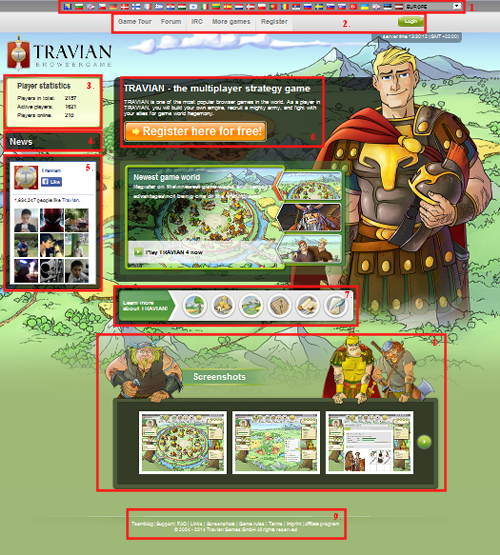
The home page (www.travian.com) is a very important page! It’s how we register for new servers, get to the login page for the different servers, and also to find announcements and useful links. Let’s get started:
As you can see, I’ve labeled the screen shot with the useful buttons. Let’s look:
1. This is the list of domains avaliable to play. It’s important to note the difference between a domain and a server. A domain is like a city whereas a server is a single neighborhood within the domain. It’s based on language, so if you feel more comfortable using another language, you would simply click the flag of the language you wish to use and you will be redirected to their home page.
2. This is the header menu. It provides useful links to help your game play and experience:
- Game Tour: This provides a very quick and simple overview of the game. It does not provide too much information and will take only a minute or two to look through. There’s also a few screen shots in this area.
- Forum: This link will take you to the official travian.com forums (forum.travian.com) where important announcements are posted. This is also where the community comes to chat to one another and where a wealth of knowledge resides.
- IRC: This is a chat program similar to other IM programs like MSN, Google Talk, Yahoo, Aim, Skype, etc. Here players can get together to talk about their game, ask questions, etc.
- More Games: So you thought that Travian Games GmbH only made Travian, eh? Well that’s not so! Like Travian? Want to see what else Travian Games GmbH has to offer? This link will show you.
- Register: This link will bring up the registration dialogue box where you will have the option to register for a server. It will by default start you on the newest server, but that can be changed by clicking the link "Play on another world".
- Login: This is what you click to bring up the list of servers for you to login to. Again, the server can be changed by clicking the appropriate link. Also, you can log directly into a server without the use of the homepage by going to the server’s address (for example tx3.travian.com).
3. This is the statistics box. It will show you statistics based on players such as active users and registered accounts.
4. This is our news box. It will give you announcements such as server restarts or the release of the latest travian.com magazine.
5. Did you know that Travian has a Facebook page? This box is our Facebook app, and will allow you to look at our Facebook page, like our page, and see who is playing Travian via Facebook likes.
6. This box is the shortcut to the registration box we talked about earlier.
7. This is just another short introduction to Travian.
8. Here we have some screen shots of the game, so that you can get a feel for the game before registering.
9. Lastly but certainly not least we have the footer menu.
- Teamblog: This will take you to the Travian Team blog to help you become acquainted with the Crew Members who help you every day.
- Support: This will take you to the Support page for help.
- FAQ: This will take you to the Travian answers, where you can look up answers to your questions.
- Links: This will give you a short list of useful links.
- Screen Shots: This will bring up the same screen shots as before.
- Game Rules: This will bring up the official Travian rules, translated for your domain. It is advised to read these throughly, so that you can ensure you are following the rules.
- Terms: This brings up the Travian Terms and Conditions that you agree to when you register an account. We recommend reading these completely and throughly as well.
- Imprint: The imprint link gives the contact information for the creators.
- Affiliate program: This will take you to the partners info page for Travian Games GmbH.
- And finally, at the very bottom of the page, is the copyright information that protects our graphics and such from people stealing them to use as their own.